
Department of Labor (DOL) SCSEP Case Management System – Grantee Performance Management System (GPMS) New User Access
REQUESTING NEW GPMS ACCOUNTS:
Before the DOL SCSEP Help team can create new GPMS accounts, first time users must establish a login.gov account:
• Please complete all of the steps listed in the GPMS New User Instructions to establish a required login.gov account
• Once the steps are completed, email CWI’s GPMS Grantee Administrator, Kyle Massenburg, at kmassenburg@cwiworks.org with a CC to your assigned Program Officer to alert us that the task is complete
• The DOL SCSEP Help team will then create the new GPMS account (time taken to complete process can vary)
GPMS Help Request Process
The Department of Labor (DOL) SCSEP Help team has implemented the GPMS Help Request Module (HRM) for all users, which connects CWI SCSEP subgrantees with quick access to expert GPMS help.
The HRM allows users to easily submit and track help request tickets, correspond with the DOL SCSEP Help Support Team, and view open and previously resolved requests directly through GPMS.
To access the HRM, active GPMS users can open GPMS and find Help Request on the top toolbar, then select +New Help Request, as shown here:
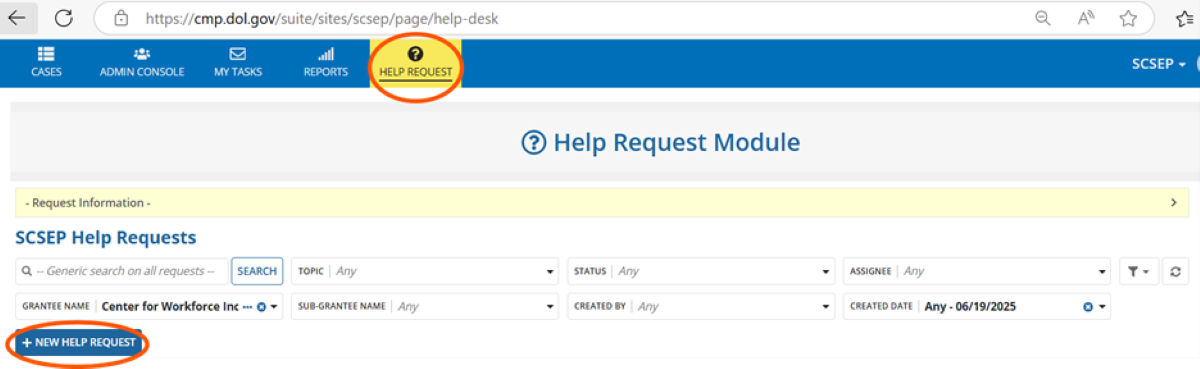
Use the form’s drop-down menus to provide information about the specific assistance you need, then submit the form. Once entered, you’ll be able to view a log of all help requests submitted and statuses.
Need help getting help via the HRM?
The HRM User Guide, with detailed instructions and screenshots for accessing the module and creating and working with your requests, is available at Help-Request-Module-User-Guide-May-2025
Center SCSEP Staff GPMS Training Videos and Webinars
-
Reassign Cases
-
Create a New Case/Enroll a Job Seeker
-
Enter Quarterly Paid Hours Using the Admin Console
-
Enter Follow-Ups for Unsubsidized Employment
-
Search for SCSEP Cases using Filters
-
Webinar – March 23, 2023
- Center SCSEP Staff GPMS Webinar—March 2023 (Link)
- Passcode: ?gt?p2s1
- Center SCSEP Staff GPMS Webinar—March 2023 (Link)
Center Provisional GPMS Forms
- The Center-Provisional GPMS Participant Form (DOC) or (PDF) (Updated on 10/11/2022)
- The Center-Provisional GPMS CSA Form (DOC) (Updated on 8/19/2022)
- The Center-Provisional GPMS Exit Form (DOC)
Center Program Officers’ GPMS Guidance and Resources
- GPMS Self-Help Troubleshooting Tips (PDF)